Installing and activating Chada Cart Recovery
Requirements
- WordPress 6.0 or newer, PHP 7.4 or newer
- WooCommerce (the plugin declares it as a required plugin and supports both the classic and the Blocks checkout, and HPOS)
- A way for your site to send email that reaches inboxes — see Email design and deliverability
Install
- Download
chada-cart-recovery.zipfrom My Account → Licenses. - In wp-admin go to Plugins → Add New Plugin → Upload Plugin, choose the ZIP, click Install Now, then Activate.
Activate your licence
- Go to Cart Recovery → License.
- Paste the key from My Account → Licenses and click Activate license.
- The page shows your plan (Starter, Growth or Pro), what it includes, and when it renews.
Each plan covers a number of stores — 1, 5 or unlimited. Every site you activate counts, including staging; deactivate a site from the License screen or from My Account to free the slot.
First run
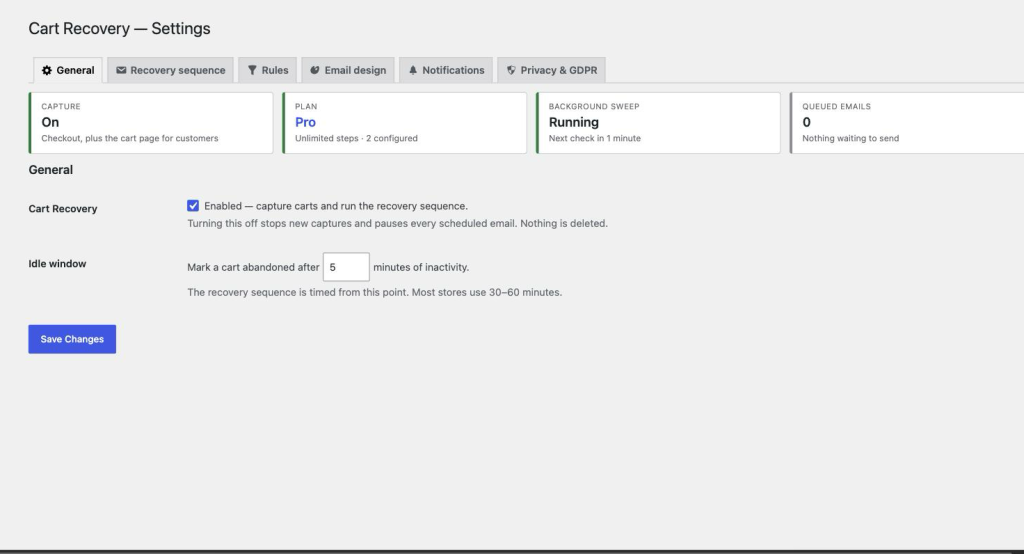
Open Cart Recovery → Settings. The General tab opens with a status panel that answers the four things you’ll want to know: is capture on, what your plan allows, whether the background sweep is running, and how many emails are queued. A default one-step sequence is already configured, so the plugin is working from the moment the licence is active.
Updates
Updates arrive through Dashboard → Updates like any other plugin, for as long as the licence is active. If it expires you keep the version you have and the plugin keeps working — only new updates and premium features pause until you renew.