Email design and deliverability
Sender
Settings → Email design → Sender: the From name and From email on every reminder. Use an address on a domain you own and send from — it’s the single biggest factor in reaching the inbox. Sending from a Gmail or Outlook address on a WordPress site will fail DMARC at most receivers.
Design
Every reminder uses one layout: your logo (or store name as text), the step’s message, the cart with product images and prices, a Complete your order button in your accent colour, and a footer that says why the shopper is receiving the email, gives your business address, and carries the unsubscribe link. The layout is built for real inboxes — it holds up in Outlook, goes full-width on phones, and stays readable in dark mode. Set the logo, colour and footer text here; the live preview on the Recovery sequence tab reflects them immediately.
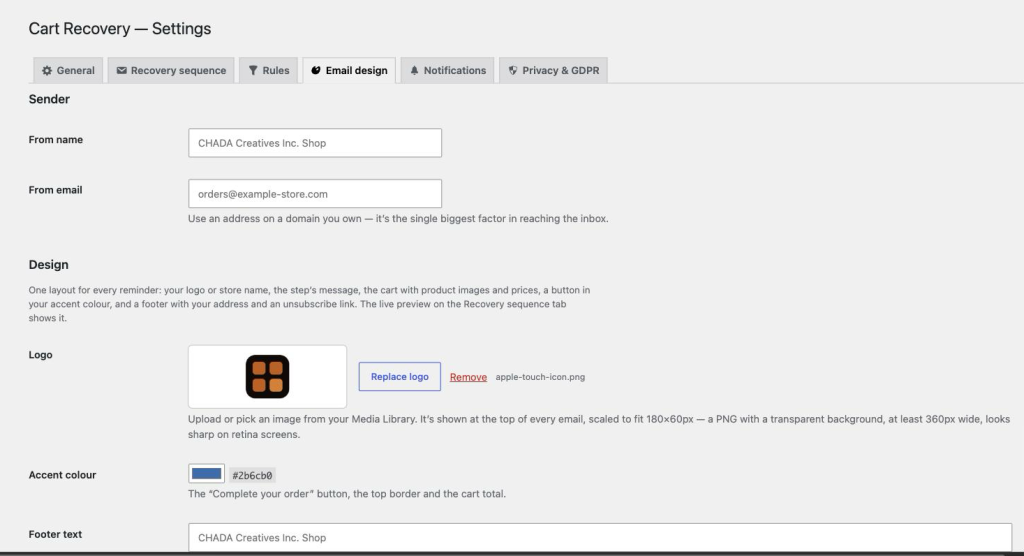
The footer text should be your business name and postal address — anti-spam law in most countries requires it. Leave it empty and the plugin uses your store name plus the address from WooCommerce → Settings.
Send a test
Below the design settings, Send a test email sends any step to an address of your choice, using two real products from your catalogue as a sample cart. Nothing is recorded. Save your changes first — the test uses saved settings.
What the plugin does for deliverability
- Every email carries
List-UnsubscribeandList-Unsubscribe-Postheaders, which Gmail and Yahoo now require from bulk senders, and an unsubscribe link in the footer. - Unsubscribed addresses are never sent to again.
- Hard bounces and spam complaints can be suppressed automatically — see Notifications, webhooks and bounces.
- If your site’s own mailer fails to hand off a message to the same address three times in a row, that address is suppressed too.
What it can’t do for you
The plugin sends through your site’s wp_mail. Whether that lands in inboxes depends on your mail setup, not on the plugin. If reminders are going to spam, the fix is almost always the same: send through a transactional email service (Postmark, SendGrid, Mailgun, Amazon SES, Brevo) via an SMTP plugin, with SPF, DKIM and DMARC set up for your domain.