Building your recovery sequence
The recovery sequence is the plugin’s heart: a list of timed emails, each sent a set time after the cart was abandoned. Settings → Recovery sequence.
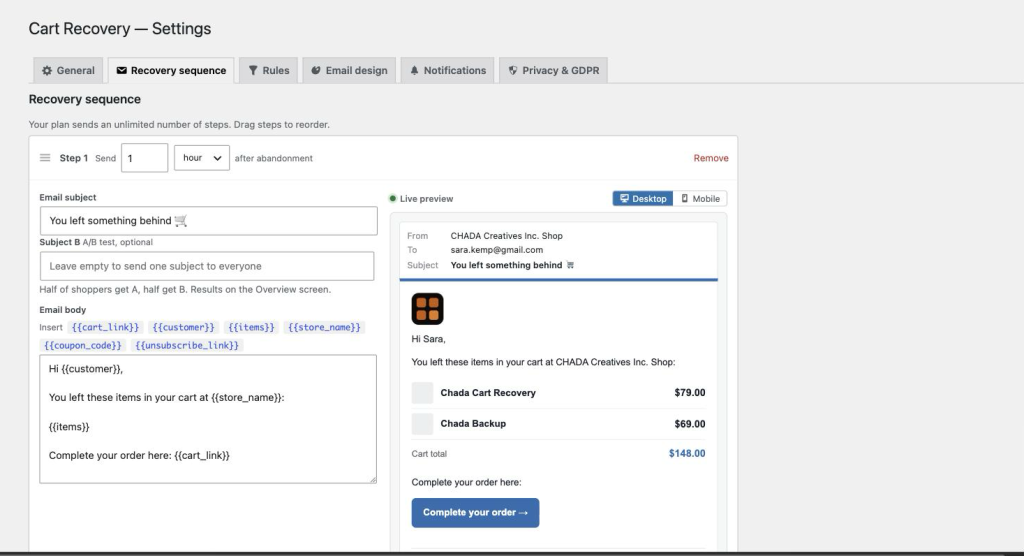
Steps
Each step has a delay (entered as minutes, hours or days after abandonment), a subject and a body. Drag the handle to reorder; Add step appends one. Your plan sets the maximum: 3 on Starter, 5 on Growth, unlimited on Pro. Steps beyond your plan stay in the editor, marked with a lock, and are simply not sent.
A sensible starting sequence: a friendly reminder after 1 hour, a second nudge after 1 day, and — on Growth or Pro — a coupon after 3 days.
Placeholders
Click a chip above the body to insert one at the cursor:
{{cart_link}}— the Complete your order button. It restores the shopper’s cart and lands them on checkout.{{customer}}— their first name, or “there”.{{items}}— the cart as a table: product image, name, quantity, price, and the total.{{store_name}}— your store’s name.{{coupon_code}}— the single-use coupon, on the step it’s attached to.{{unsubscribe_link}}— an “unsubscribe” link. One is added to the footer regardless, so you only need this if you want it in the body too.
Templates are plain text. A blank line starts a new paragraph and a single line break stays a line break; {{items}} and {{cart_link}} always render as full-width blocks, so put each on its own line. HTML you type is shown as text, not rendered, so a template can’t break the email’s layout.
The live preview
The preview beside each step shows the real email shell — your accent colour, logo, sender name and footer from Email design — with sample products, so what you see is what the shopper gets. Toggle Desktop / Mobile to check both widths.
A/B subject lines (Growth and Pro)
Give a step a Subject B and half of shoppers get A, half get B, chosen consistently per cart. The Overview shows opens, clicks and conversions for each and marks the winner. Leave Subject B empty to send one subject to everyone.
Coupon incentive (Growth and Pro)
Under the steps, switch on Coupon incentive, choose the discount (percent or fixed), which step it’s attached to, and how many days it stays valid. A unique single-use WooCommerce coupon is created when that step sends; put {{coupon_code}} in that step’s email.
Translations (WPML / Polylang sites)
On a multilingual site each step gains a Translations section with a subject and body per language. A shopper receives the version for the language they were browsing in; any field left empty falls back to the main text. The plugin’s own wording in the email — the button, “Cart total”, the unsubscribe line — ships in English, French, Spanish and German, and the recovery link lands on the checkout page in that language.
Sending by hand
On the Carts screen, hover a cart: Send next step now sends the next unsent step immediately (ignoring its delay and the send window), Resend step 1 does what it says, Ignore takes the cart out of the sequence. None of these will email an unsubscribed address.