How Fraud Scoring Works
Every order placed through WooCommerce (classic checkout or Cart Blocks) is evaluated by WooFraudGuard’s rule engine the moment the order is created. The engine runs all enabled rules, totals their weighted contributions, and produces a final score between 0 and 100.
The scoring pipeline
- Order created — WooCommerce fires the checkout hook after the customer clicks “Place order”.
- Context assembled — the engine reads the order’s billing address, shipping address, IP, email, device fingerprint, and behavioral signals (if premium).
- Rules evaluated — each enabled rule inspects the context and returns a contribution between 0 and 100.
- Weighted sum — each contribution is multiplied by its rule weight and the results are summed, then clamped to 0–100.
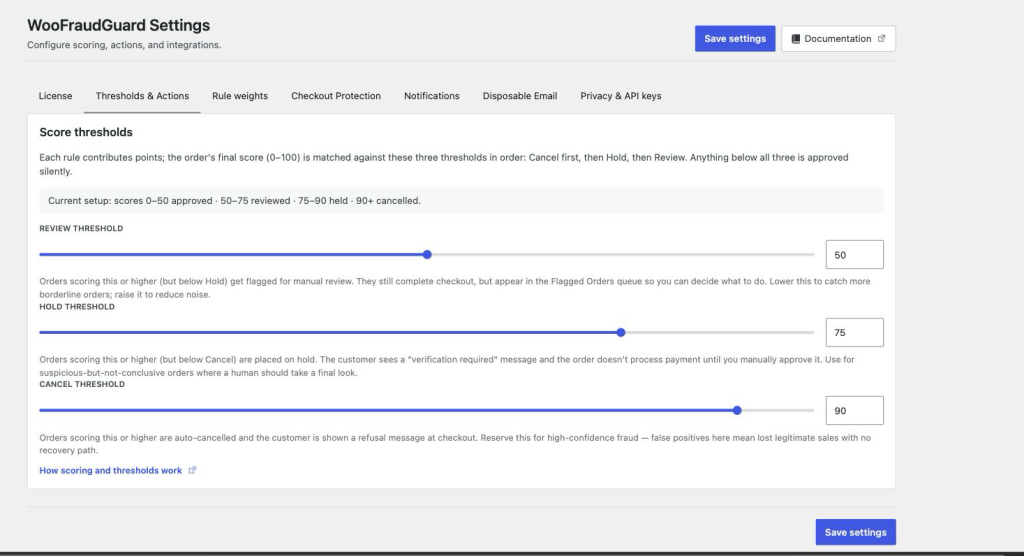
- Decision dispatched — the final score is matched against the three thresholds (Review → Hold → Cancel). Anything below the Review threshold is approved silently.
- Score stored — the score, decision, and per-rule breakdown are saved to the database and appear in Flagged Orders.
The seven Lite rules
| Rule | What it checks | Default weight |
|---|---|---|
| IP risk | Detects datacenter/hosting IP ranges (AWS, GCP, DigitalOcean, Hetzner, OVH, Linode) and private or loopback addresses. VPN, proxy and Tor detection requires the optional MaxMind integration. | 0.6 |
| Address mismatch | Compares billing and shipping countries; flags cross-border discrepancies. | 0.8 |
| Velocity | Counts orders from the same IP, email, or card BIN within a configurable window (default 60 minutes). | 0.9 |
| Blocklist match | Checks the order’s email, account username, IP, phone, card BIN + last 4, and device fingerprint against the manual blocklist. | 1.0 |
| Email heuristics | Detects disposable / temporary-mail domains, addresses previously linked to a chargeback, and suspicious patterns (throwaway TLDs, digits-only domains, gibberish local-parts). There is no domain-age check. | 0.85 |
| BIN country mismatch | Compares the card’s issuing country (from the first 6 BIN digits) against the billing country. | 0.7 |
| Always safe | Internal test rule — marks certain known-safe orders and gives them a contribution of 0 so nothing else fires. | 0.0 |
Premium rules (license required)
| Rule | What it checks | Default weight |
|---|---|---|
| Behavioral heuristics | Scores based on how the customer filled in the form — time taken, paste vs type, copy events, tab switches, mouse entropy, autofill use, email typing rate, submission attempts. | 0.0 (ships off) |
| Fast checkout | Flags orders completed faster than the configured minimum time in seconds. | 0.0 (ships off) |
| MaxMind minFraud | Sends the order to MaxMind’s commercial risk API and incorporates their risk score. | 0.0 (ships off) |
| Chargeback history | Checks the order graph — if any linked prior order (same device, email, or card) resulted in a chargeback, the score spikes. | 1.0 |
Three of the four premium rules ship at weight 0, which means they are registered but contribute nothing until you raise the slider under Settings → Rule weights. That is deliberate: behavioural collection is a privacy decision, and MaxMind costs money per lookup. Activating a licence unlocks them; you switch them on.
Decision thresholds
The final score is compared against three thresholds (all configurable in Settings → Thresholds & Actions):
| Score range | Decision | What happens |
|---|---|---|
| 0 – Review threshold | Approve | Order proceeds normally. Nothing visible to the customer or admin. |
| Review – Hold threshold | Review | Order completes checkout, but appears in the Flagged Orders queue for manual inspection. |
| Hold – Cancel threshold | Hold | Order is placed on hold. Payment is not collected until an admin manually approves it. |
| Cancel threshold and above | Cancel | Order is automatically cancelled and the customer sees a refusal message at checkout. |
Was this page helpful?