Configuring Score Thresholds
Score thresholds determine what happens to an order based on its final risk score. You configure them under WooFraudGuard → Settings → Thresholds & Actions.
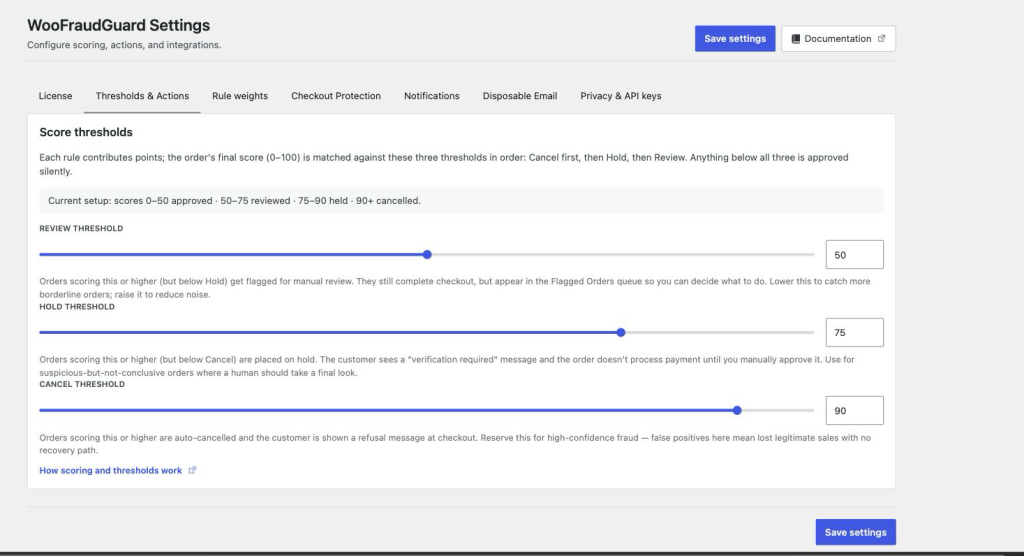
The three thresholds
Review threshold (default: 50)
Orders scoring at or above this value but below the Hold threshold are flagged for manual review. Checkout completes normally — the customer receives their order confirmation — but the order appears in the Flagged Orders queue so you can inspect it. No payment is withheld.
Lower this to catch more borderline orders; raise it to reduce noise.
Hold threshold (default: 75)
Orders scoring at or above this value but below the Cancel threshold are placed on hold. The customer sees a “verification required” message and payment is not collected until you manually change the order status to Processing. Use this for suspicious-but-not-conclusive orders where a human should take a final look.
Cancel threshold (default: 90)
Orders scoring at or above this value are auto-cancelled. The order is created in WooCommerce and immediately set to Cancelled, and the customer sees a refusal message at checkout. Because the order still exists you can inspect it afterwards, and restore it if it turns out to be a false positive. Reserve this band for high-confidence fraud all the same — the customer has already been turned away.
How to read the summary line
The settings screen shows a plain-language summary of your current setup, for example:
Current setup: scores 0–50 approved · 50–75 reviewed · 75–90 held · 90+ cancelled.
Tuning advice
- Start with the defaults (50 / 75 / 90) and monitor the Flagged Orders queue for a week before adjusting. They are deliberately conservative — a newly installed fraud plugin should not be cancelling orders on day one.
- If too many legitimate orders are being flagged, raise the Review threshold by 5–10 points.
- If you are seeing chargebacks that were approved, lower the Cancel threshold — but be cautious about false positives.
- The Hold band is your safety net. Widen it (e.g., 50–85) if you prefer to manually approve uncertain orders rather than auto-approve or auto-cancel them.
- On local development sites you may see IP risk scores of 30 for every order because the loopback IP
127.0.0.1triggers the IP risk rule. This is expected — do not lower Cancel on a staging site and then deploy the same settings to production.