Premium Features
A Premium license unlocks four additional fraud rules, order-graph linking, and the Stripe/PayPal dispute webhooks. All three Premium tiers unlock the same feature set — they differ only in how many sites you may activate on. Premium features degrade gracefully: if the license is inactive, the plugin silently falls back to the seven Lite rules. Risk explanations are not part of this — they work on every tier.
Behavioral biometrics
WooFraudGuard injects a lightweight JavaScript collector into every checkout page. It records how the customer interacted with the form without capturing any keystrokes or personal data:
- Time from page load to order submission
- Whether fields were typed or pasted
- Copy events (copy-pasting from a card or notes app)
- Tab-switch count (switching away mid-checkout)
- Mouse movement entropy
- Autofill detection
- Typing speed on the email field
- Number of submission attempts
A human filling in a checkout form produces a recognisable pattern. Bots and scripts produce outliers — too fast, no mouse movement, all fields pasted in one event. The Behavioral heuristics rule scores these signals and contributes up to 100 points to the final risk score.
Two switches, both off out of the box. Turn the collector on under WooFraudGuard → Settings → Privacy & API keys → Enable behavioral signals collection, then raise the Behavioral heuristics weight above 0 under Settings → Rule weights — the rule ships at weight 0, so collection alone changes no scores.
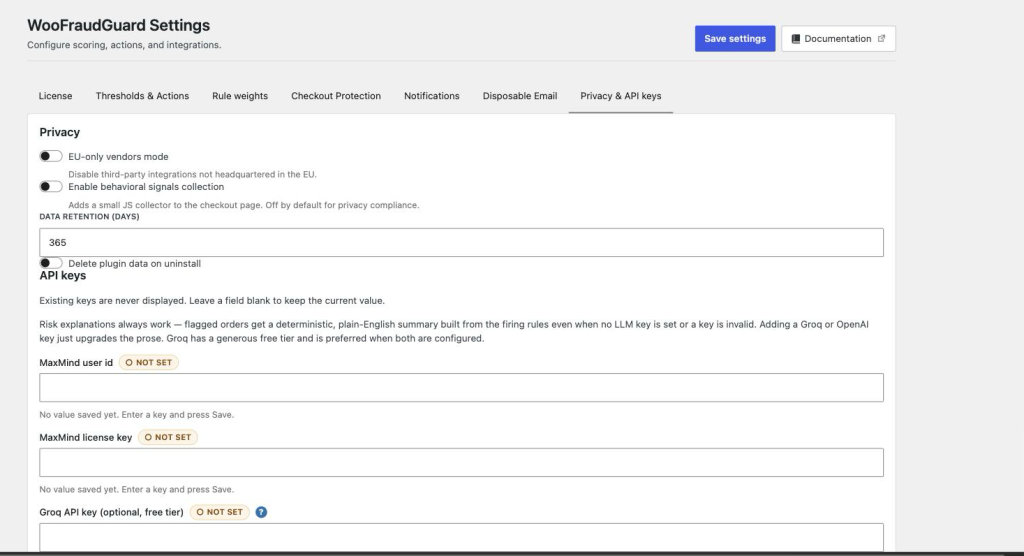
Fast-checkout bot detection
The Fast checkout rule flags any order submitted faster than a configurable minimum time (default: 5 seconds from page load). Configure the minimum under Settings → Checkout Protection.
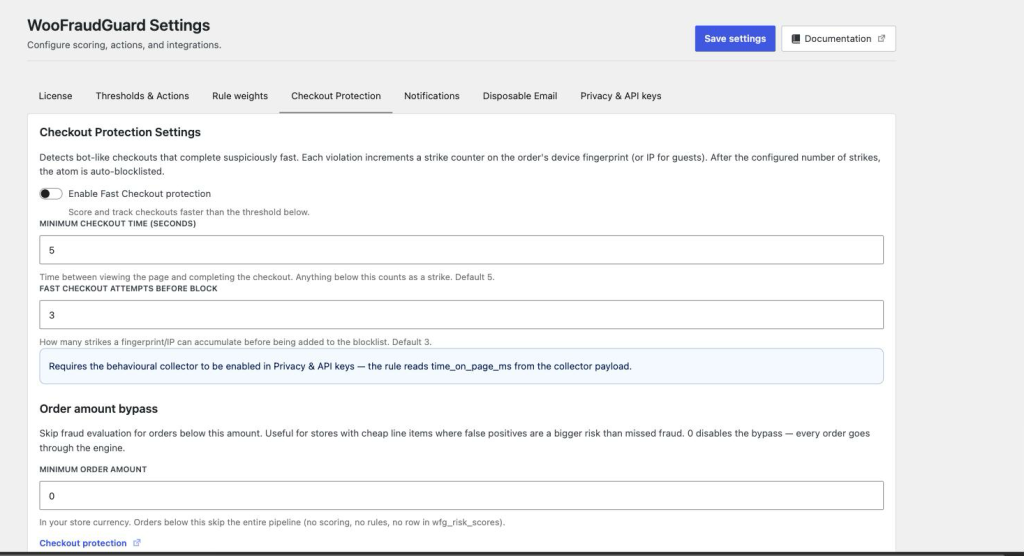
MaxMind minFraud
WooFraudGuard can send each order to MaxMind’s minFraud API and incorporate their risk score alongside the built-in rules.
- Create a MaxMind account and generate a licence key from their portal.
- In WooFraudGuard → Settings → Privacy & API keys, enter your MaxMind User ID and licence key.
- The MaxMind rule weight controls how heavily their score influences the final result.
MaxMind requests are made server-side and are not visible to the customer.
Chargeback feedback loop
You register the webhook yourself, once, in your gateway’s dashboard — WooFraudGuard shows the exact URL to paste on the settings screen. Stripe sends charge.dispute.created and charge.dispute.funds_withdrawn; PayPal sends CUSTOMER.DISPUTE.CREATED and CUSTOMER.DISPUTE.UPDATED. Nothing else is subscribed to, and the eventual win/lose outcome of a dispute is not tracked.
When one of those events arrives, WooFraudGuard verifies the signature, identifies the original order, and:
- Records the dispute in the wfg_chargebacks table (deduped per gateway and reason) and adds a private note to the order.
- Auto-blocklists the buyer’s email and device fingerprint. IP, phone and card are opt-in — see Managing the Blocklist.
What it does not do: it does not re-score pending sibling orders, and it does not change the order’s status — that stays with your gateway and WooCommerce. Nothing about the scoring model changes either; no weights are adjusted. The effect on future orders is indirect: the next time a linked order is evaluated, the Chargeback history rule and the blocklist pick up the new record and score it higher.
Configure your payment gateway webhook secrets under Settings → Privacy & API keys:
- Stripe — paste the endpoint signing secret from your Stripe dashboard. The WooFraudGuard webhook URL to register in Stripe is shown on the same settings screen.
- PayPal — enter your PayPal Client ID, Client Secret, and Webhook ID.
Risk explanations (available on every tier)
Every flagged order gets a plain-language explanation automatically, with no licence, no API key, and no button press. It is assembled from a deterministic template out of the rules that actually fired, so it always works, never calls out to a network, and costs nothing.
Adding a Groq or OpenAI API key under Settings → Privacy & API keys upgrades the prose — the same facts, written more fluently. Groq is preferred when both are configured. If a key is missing, invalid, or the call fails, the template explanation is used instead and nothing breaks. The Generate button in the Score detail modal regenerates the explanation for that order.