Rule Weights
Rule weights let you control how much influence each fraud signal has on the final score. A higher weight amplifies that rule’s contribution; a weight of 0 disables the rule entirely. Configure them under WooFraudGuard → Settings → Rule weights.
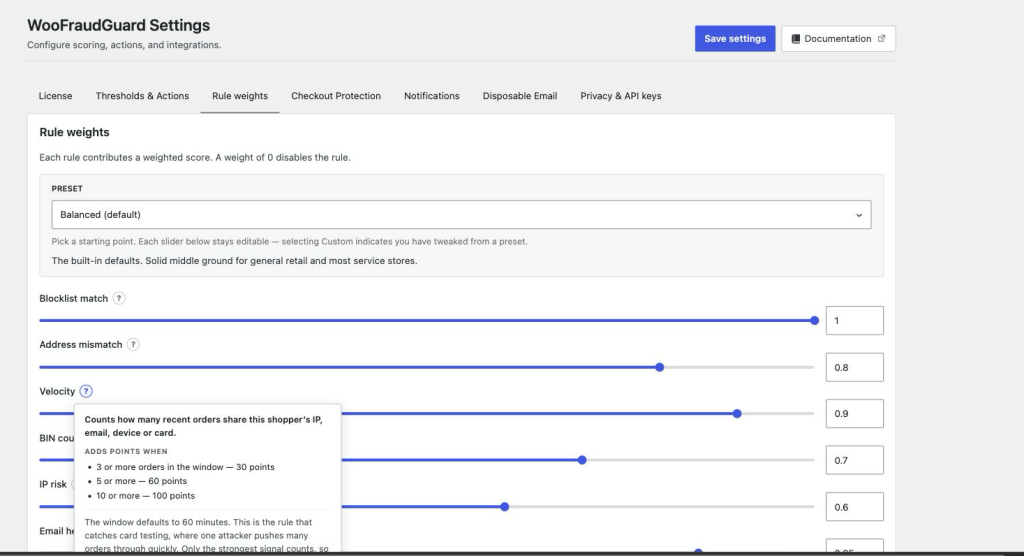
Presets
The Preset dropdown at the top applies a predefined weight profile. After choosing a preset the individual sliders update to its values — you can then fine-tune any slider and the preset automatically changes to Custom.
| Preset | Best for |
|---|---|
| Conservative | Minimises false positives. Best for new stores still establishing a baseline, or stores where blocking a legitimate buyer is costly (high-AOV, narrow customer base). |
| Balanced (default) | The built-in defaults. Solid middle ground for general retail and most service stores. |
| Aggressive | Maximises detection. Recommended for digital goods, ticketing, gift cards, and other high-chargeback verticals. Expect more orders to be flagged for Review or Hold. |
Per-rule weights
Each weight slider runs from 0 (rule off) to 1.0 (maximum influence). The contribution a rule returns is multiplied by its weight before being added to the total. So a rule that flags an order with +60 raw contribution at weight 0.5 adds +30 to the final score.
| Rule | Balanced default | When to increase | When to decrease |
|---|---|---|---|
| Blocklist match | 1.0 | Always leave at 1.0 — blocklist entries represent confirmed bad actors. | Lower only if you frequently need to manually override blocked orders. |
| Velocity | 0.9 | High-value stores or subscription boxes where card testing is common. | Stores with expected burst patterns (flash sales, events). |
| Address mismatch | 0.8 | Physical goods where ship-to-a-different-country is suspicious. | Gift shops or digital goods where billing ≠ shipping is normal. |
| BIN country mismatch | 0.7 | Domestic-only stores. | International or travel-related stores where foreign cards are routine. |
| IP risk | 0.6 | Stores seeing orders from cloud/hosting IP ranges. | Tech-savvy customer base where VPN use is routine (e.g., privacy tools) — note that plain VPN exits are only detected with MaxMind connected. |
| Email heuristics | 0.85 | Stores where disposable email fraud is common. | B2B stores where bulk alias patterns are expected. |
| Always safe (test) | 0.0 | Leave at 0 unless directed by support. | — |
Premium rule weights (Behavioral heuristics, Fast checkout, MaxMind, Chargeback history) follow the same 0–1.0 slider pattern and are shown on the page when a compatible license is active. Three of them — Behavioral heuristics, Fast checkout and MaxMind — ship at 0, so unlocking them with a licence is not the same as switching them on: raise the slider to give them any influence. Chargeback history ships at 1.0.